GetApp offers objective, independent research and verified user reviews. We may earn a referral fee when you visit a vendor through our links.
Our commitment
Independent research methodology
Our researchers use a mix of verified reviews, independent research, and objective methodologies to bring you selection and ranking information you can trust. While we may earn a referral fee when you visit a provider through our links or speak to an advisor, this has no influence on our research or methodology.
Verified user reviews
GetApp maintains a proprietary database of millions of in-depth, verified user reviews across thousands of products in hundreds of software categories. Our data scientists apply advanced modeling techniques to identify key insights about products based on those reviews. We may also share aggregated ratings and select excerpts from those reviews throughout our site.
Our human moderators verify that reviewers are real people and that reviews are authentic. They use leading tech to analyze text quality and to detect plagiarism and generative AI.
How GetApp ensures transparency
GetApp lists all providers across its website—not just those that pay us—so that users can make informed purchase decisions. GetApp is free for users. Software providers pay us for sponsored profiles to receive web traffic and sales opportunities. Sponsored profiles include a link-out icon that takes users to the provider’s website.
6 Strategies for Your Software Implementation Plan
Six strategies to create an efficient software implementation plan and avoid any pitfalls


Whether you’re upgrading from spreadsheets to business intelligence software or need a help desk program to replace your old email system, deciding which type of Software-as-a-Service (SaaS) best solves your problem is only the first step of a long process.
According to GetApp’s 2025 Tech Trends Survey, 75% of companies plan to increase their software spend in 2025.* More than one in three (36%) expect to face challenges implementing tech effectively. Additionally, 59% of companies have experienced regret for one (33%) or multiple (26%) technology purchases in the last year. When asked about their regretful purchase, 52% said it had a significant financial impact on their business—an additional 6% said it caused a monumental impact.
Fortunately, you can avoid typical software implementation pitfalls by developing a robust plan that includes the following six strategies. Using insights from GetApp’s 2025 Tech Trends Survey along with insights from our buyer advocate team lead Nathan Pozen, who helps software users find the right solution for their business needs, we’ll run you through the six most important strategies to ensure you nail your software implementation.

Nathan Pozen, Buyer advocate team lead for GetApp
1. Match your needs with vendor offerings
Focus on what the software should do for your organization rather than on what it can do. Understand that business software isn’t built just for your organization. It’s designed for as many organizations as possible. Don’t get distracted by vendors’ fancy websites or cool marketing tactics. Remember, you aren’t buying bells and whistles; you are buying business software to simplify your existing processes or formalize those that aren’t yet well defined.
This often requires tweaking workflows to fit into the new software’s framework. Your goal when discussing needs with vendors is to determine exactly how your processes can be adapted to their product and whether or not the result is an overall improvement that helps your organization better achieve its goals.
Understand the level of support you’ll receive, both during and after implementation. Check if the vendor offers on-site training? Will 24-hour technical support be available, or will you be on your own? Answers to these questions might vary depending on the package selected.
Also, by adopting SaaS, you are allowing third-party access to your organization’s data. To mitigate potential data compliance issues, it’s important to verify that the software adheres to standards and certifications relevant to your industry.
2. Conduct due diligence
Before making a buying decision, ensure that you completely understand service-level agreements, contractual obligations, and any potential additional charges.
To conduct due diligence for vendors, follow these steps:
Speak with vendor reference clients to learn about their experiences and identify potential pain points that you haven’t thought about. This will give you a chance to stack up the vendor’s promises against real-world scenarios.
Ask questions related to why they chose the vendor’s product, whether they are satisfied with the return on investment, and if they incurred any unexpected charges. Also, consider asking if they’ve been compensated in any way for serving as a reference.
Read product reviews to gauge how the software’s usability and to determine if businesses from your industry are using the product for similar purposes. For instance, reviews on GetApp are segregated by the industry type and business size of reviewers’ organization.
Product reviewers often provide their professional information or LinkedIn profile details. You can connect with them to start a conversation and request further details about their experience with the product. Our survey found that as buyers conduct formal research and build out their final list of potential vendors, the most influential sources of information are customer reviews (41%) and recommendations from industry experts (39%).
Engage experienced consultants to seek assistance with software implementation. However, remember that hiring one can be expensive and will require yet another round of reference checks. Ensure that they have significant experience in your line of business.
In addition to these steps, Pozen suggests that you ask how their pricing has increased historically so that you can adequately factor that into your three, five, or 10-year budgeting plans. If the price of the software has gone up 3% every year for the last five years, you should consider that when making your decision so that you don’t over budget.
3. Consider the impact of who, what, and when
Ascertain who the new software will affect, what systems will it replace, and when the implementation will have the least impact.
Who is affected? Seek input from prominent members of each department. Identify software users in each department, and document how their workflow might get affected.
What is being replaced? If you’re replacing an existing system, the potential for duplicated data and processes must be identified and mitigated. Also, just because a feature is included in the new software doesn’t necessarily mean it should be used. It might also make sense to limit initial adoption to specific functions and incorporate more features with time.
When should it happen? Bad timing can disrupt your software implementation plan. Minimize the potential impact of downtime by determining when the implementation should or should not take place. Identify time-sensitive projects, narrow your dates, and consider administering a survey that allows employees to rank preferences. There are several free survey tools that you can use for this purpose.

Pozen remarks that it’s important to ask the right questions when meeting with vendors to ensure that the software you choose provides a solution for all stakeholders. If you only have one person conducting the actual search and talking to vendors, you need to gather meaningful feedback from everyone who will be using the software to ensure that your contact can ask the right questions.
4. Make superusers your new best friends
Designate superusers who will champion the new software and help others learn and adapt to new workflows. Superusers should be selected based on their technical ability and rapport with the rest of the team. You can also select superusers from among employees who had lobbied for the new tool, as they are more likely to show extra enthusiasm in the project.
Superusers should be involved early, often right from the software selection process. Allow them to take part in product demos and involve them in end user training.
During implementation, superusers should be kept apprised of all updates, problems, or technical glitches and be empowered to act as a liaison between management and end users. Post implementation, superusers can help bring new hires or users up to speed and act as an ongoing resource.
5. Formally track your software implementation plan
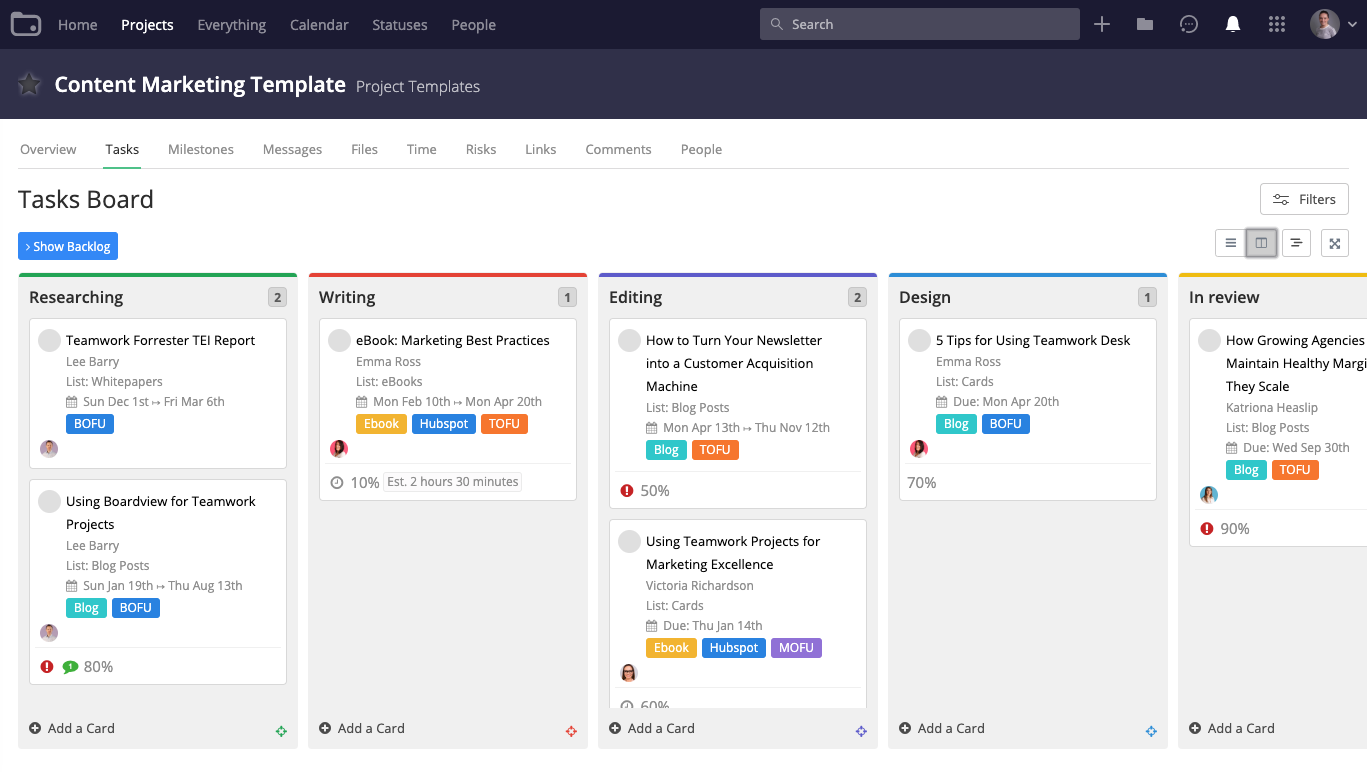
If your software implementation plan is relatively straightforward, tracking its progress might only require a free tool, such as Google Sheets. More complicated plans, however, can benefit from a comprehensive task management tool. Optionally, you can track tasks using a resource your employees are already familiar with.
6. Be upfront with end users
Communication is key to successful software implementation, and you need to clearly explain the reasons for the change. Maybe you’ve outgrown an existing solution and need to replace it with something more robust, or perhaps you need a new solution to problems that have been piling up.
Explain to employees how exactly they’ll benefit from the new software and the ways in which it’ll make their jobs easier. Customize messaging according to how the software will be used by each department of your business.
Explaining the reasons for change and defining the expected benefits will comfort skeptical employees and help win over those who didn’t think there was anything wrong with the old ways.
Software implementation plans aren’t supposed to be easy
Adjusting to new technology always brings a level of frustration. Sugarcoating the transition to a new system will only result in inflated expectations and staff disengagement. Instead, position the changeover as a conquerable challenge that will bring your team together.
Visit our software categories page to choose software tools that can ease the implementation process. You can also read product descriptions and user reviews to assess software usability.
Check out these additional resources
Survey methodology
2025 Tech Trends Survey was conducted online in August 2024 among 3,500 respondents in the U.S. (n: 700), U.K. (n: 350), Canada (n: 350), Australia (n: 350), France (n: 350), India (n: 350), Germany (n: 350), Brazil (n: 350), and Japan (n: 350), at businesses across multiple industries and company sizes (five or more employees). The survey was designed to understand the timeline, organizational challenges, adoption & budget, vendor research behaviors, ROI expectations, and satisfaction levels for software buyers. Respondents were screened to ensure their involvement in business software purchasing decisions.
More on Software Buying Tips

Mar 25, 2025


Feb 25, 2025

Sep 27, 2024